
NFC Use Cases
NFC for Dubai Restaurants: Complete Setup Guide
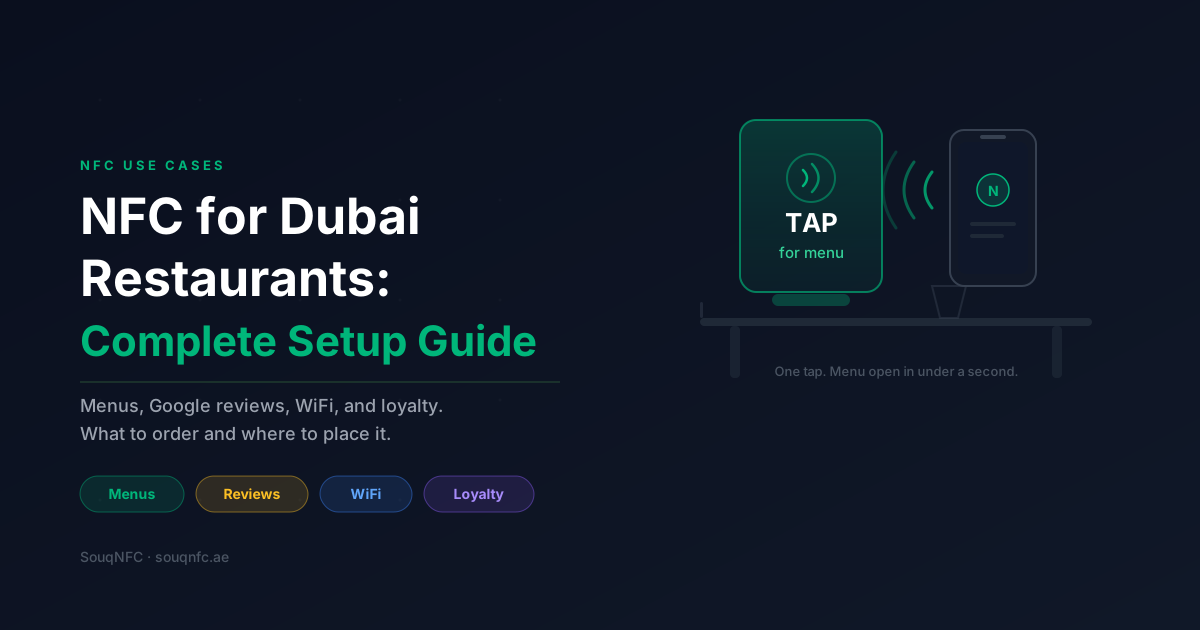
A guest sits down in a restaurant on Al Wasl Road at 9pm. The room is deliberately dim. They pick up the table card, open their camera, and spend eleven seconds trying to get a QR code to focus. Two tables away, a guest taps their phone on a stand and the menu is open in under a second. That gap is the entire argument for NFC in a restaurant, and it compounds across every table, every service, every night.
Most guides on this topic stop at “NFC menus are faster.” That is true and it is not enough to run a rollout on. What follows is the operational version: which touchpoints actually earn their place on your floor, what to order for a given cover count, where the tags go, and what breaks in month two if you skip the pilot.
This guide assumes a Dubai or wider UAE restaurant of 30 to 120 covers. The logic scales up and down, but the order quantities and the rollout timeline are written for that range.
Where does NFC actually fit in a restaurant?
Four touchpoints carry almost all the value: the table (menu), the payment counter or bill folder (Google review), the entrance or bar (WiFi access), and the returning guest (loyalty). Everything else is optional.
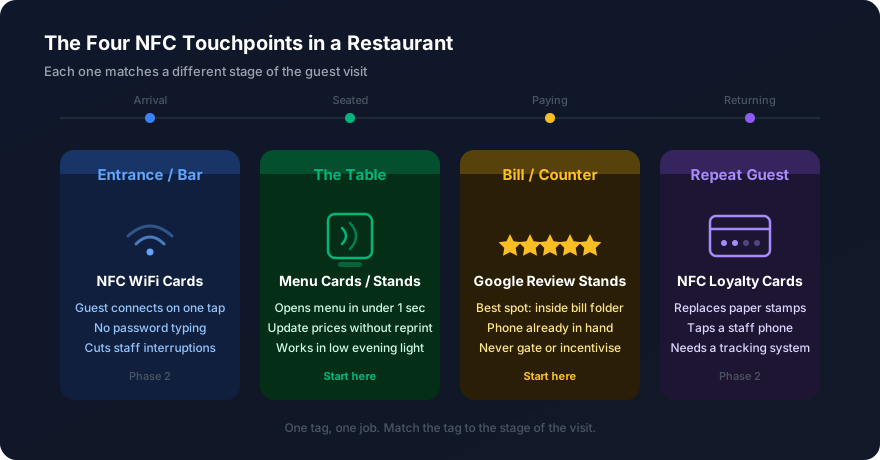
The mistake almost every first-time buyer makes is ordering one type of product and putting it everywhere. NFC works because each touchpoint has a different job at a different moment in the guest's visit. A tag at the table when the guest has just sat down should never point to a review page, because the guest has nothing to review yet.
Map the guest journey first, then order against it. Arrival, seating, ordering, eating, paying, leaving. Each stage has one thing you want the guest to do, and at most one of those things justifies a tag.
What do you need in place before you order?
Every destination URL must be live, mobile-tested, and final before encoding. Tags are rewritable, but reprinting branded hardware is not, and a broken link on a table stand costs you the tap and the trust.
Work through this list before you place an order:
- 1.A mobile-first digital menu. It loads in under two seconds on 4G, prices are current, and it does not require pinch-zoom. A PDF menu is the single most common reason NFC menu rollouts fail. Guests will not zoom around a PDF at a dinner table.
- 2.A direct Google review link. Not your Google Business Profile, the write-review link that opens the star rating straight away. Every extra tap between the guest and the stars loses you reviews.
- 3.Final guest WiFi credentials. If you rotate the password monthly, NFC WiFi cards will fight you. Set up a dedicated guest network with a stable password before ordering.
- 4.A decision on your table surface. Marble, wood, glass, and stone are all fine. Metal tables and metal-trimmed tables need on-metal tags with a ferrite layer. Check before you order, not after.
- 5.Arabic and English where it matters. Menu content should serve both. The instruction text on the physical stand usually works best bilingual, since a single word of guidance drives the tap.
If the menu is not ready, order the review stands first and add menus in a second batch. Review stands have no content dependency beyond one link, so they are the fastest touchpoint to get live.
How do you set up NFC menus at the table?
Use a standing unit, not a flat sticker, and place it where the guest looks when they sit down. Standing units get roughly twice the engagement of flat tags because they are visible from a seated position.
NFC menu cards and NFC table stands solve the same problem in two formats. Table stands suit dining tables where there is room for a vertical unit. Menu cards suit tight two-tops, bar counters, and outdoor terraces in summer where anything lightweight blows over.
Placement that works
Put the stand in the centre of the table next to the condiments, angled toward the entry side of the seating. Guests scan the table visually as they sit down, and anything in the outer third gets missed. On banquette seating, position it toward the banquette side: that guest is seated first and settles faster.
What the stand should say
Keep the instruction to three words or fewer. “Tap for menu” outperforms anything longer. Add a small phone icon showing the tap point on the top third of the unit, because guests who have not used NFC before will tap the middle of the card and get nothing. The antenna position matters and your signage should show it.
Keep a printed fallback
Hold six to eight printed menus behind the host desk. Older phones, dead batteries, and guests who simply prefer paper are all real. Restaurants that go fully digital with no fallback generate complaints that show up in the same Google reviews they were trying to grow. For the wider comparison between the two scanning methods, the NFC vs QR code breakdown for UAE businesses covers where each one wins.
How do you use NFC to get more Google reviews?
Place the review stand at the payment moment, not the table. The guest has just finished eating, the experience is fresh, and they are already holding their phone to pay. That is the highest-conversion window you get.
Google review stands work in three positions, in order of effectiveness: inside the bill folder when it goes to the table, on the payment counter next to the card machine, and at the exit. The bill folder placement performs best because it arrives at a moment when the guest is already engaged with the transaction rather than walking away.
The server's phrasing does more work than the hardware. “If you enjoyed it, a review really helps us” while placing the folder down converts far better than a stand sitting silently on a counter. Brief the floor team on one sentence and keep it consistent across shifts.
One caution worth stating plainly: never gate the tap behind a rating filter, and never offer anything in exchange for a positive review. Google's policies prohibit review gating and incentivised reviews, and profiles get penalised for it. Ask everyone, accept whatever comes back.
What about WiFi, loyalty, and the rest of the floor?
WiFi and loyalty are second-phase touchpoints. Add them once menus and reviews are running, because each one needs its own setup work and rolling all four out at once overloads the floor team.
Guest WiFi
NFC WiFi cards connect a guest to the network on a single tap with no password typing. In a cafe or a restaurant where guests work or linger, this removes the most common staff interruption during service. Place them at the entrance, on bar counters, and in any seating area that functions as a workspace during the day.
Loyalty
NFC loyalty cards replace the paper stamp card that lives in a guest's glovebox and never comes back. The card taps against a staff phone or tablet at the counter. Only commit to this once you have a system that tracks the visits, because the card is the easy half of the problem.
Delivery bags and takeaway
NFC stickers on takeaway packaging and delivery bags extend the touchpoint past your four walls. A sticker on the bag lid that opens a reorder page or a review link reaches the aggregator customer you otherwise never speak to directly. This is the highest-upside and least-used option on the list for UAE restaurants.
The management team
For managers handling supplier meetings, food festivals, and hotel partnerships, NFC business cards are a small line item with a disproportionate effect at industry events, where a restaurant GM might meet forty suppliers in a day.
How long does a full rollout take?
Budget two to three weeks from decision to full floor coverage, with a one-week pilot in the middle. Restaurants that skip the pilot almost always reorder, because placement and wording problems only surface under real service conditions.
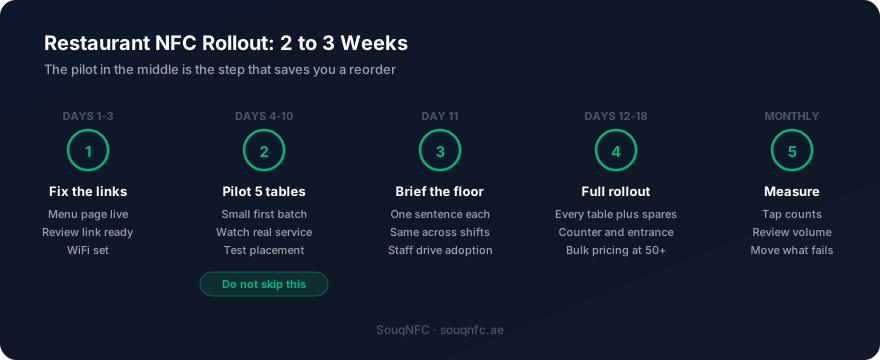
The pilot is the step worth defending when someone wants to move faster. Five tables for one week tells you whether guests notice the stand, whether servers remember to prompt, and whether your menu page actually holds up on a phone in a dark dining room. Those three answers determine the size and shape of your full order.
For the full-floor order, work out quantities from your cover count. A 14-table restaurant needs roughly 18 to 20 units including the host desk, the counter, the exit, and spares. Most suppliers apply bulk NFC order pricing from around 50 units, so a multi-branch group should consolidate branches into one order rather than ordering site by site.
What goes wrong, and how do you avoid it?
Five failure modes account for nearly every disappointing rollout:
- ·The PDF menu. It technically works and guests hate it. Build a real mobile page before you order anything.
- ·Metal surfaces. Standard tags flat against metal do not read. Confirm your table and counter materials and order on-metal tags where needed.
- ·Silent staff. Hardware alone converts poorly. One trained sentence per touchpoint is the difference between a stand that works and a stand that collects dust.
- ·Wrong tag, wrong moment. Review tags at the table catch guests before they have eaten. Menu tags at the exit catch guests on their way out. Match the tag to the stage.
- ·No measurement. Use a link that reports clicks. Without tap data you cannot tell a placement problem from a content problem, and you will guess wrong.
If NFC is new to your team, the complete NFC guide for UAE businesses covers how the technology works before you start specifying products. For the product range itself, the NFC for restaurants Dubai page lists what is available and the current per-piece pricing.
Frequently Asked Questions
Do guests need an app to use an NFC menu?
No. Every iPhone from the XS onward and virtually every Android phone sold in the UAE reads NFC tags natively. The guest taps the stand and the menu opens in their browser. There is nothing to download and nothing to sign into.
How many NFC stands does a restaurant need?
Plan for one stand per table, plus one at the host desk, one at the payment counter, and one near the exit. A 40-cover restaurant with 14 tables typically orders 18 to 20 units. Order a few spares, because stands do get knocked off tables during service.
Will NFC work through a marble or glass tabletop?
Marble, glass, wood, and stone do not block NFC. Metal does. If your tables have a metal surface or metal trim, you need tags with a ferrite shielding layer, which suppliers list as on-metal or metal-safe tags. Standard tags mounted flat on metal will not read at all.
Can one NFC tag do both the menu and the Google review?
A tag holds one link, so it does one job well. Mixing them is a mistake in practice: the menu tap happens at the start of the meal and the review tap happens at the end. Use separate tags at separate points in the room, otherwise you will collect menu taps when you wanted reviews.
What happens if we change our menu or prices?
Nothing on the tag changes. The tag points to a URL and you update whatever sits at that URL. This is the main operational advantage over printed menus in a market where suppliers and prices shift often. You never reprint the hardware.
Is NFC better than a QR code on the table?
NFC is faster because the guest taps rather than opening a camera, framing a code, and waiting for focus. It also works in the low light most Dubai restaurants run in the evening, where QR codes often fail. Many restaurants print a QR code on the same stand as a fallback for older phones.
Does NFC help with Dubai Municipality food safety compliance?
Digital menus make allergen and ingredient information easier to keep current, which supports compliance record keeping. NFC itself is not a certification requirement. Check current Dubai Municipality food safety guidance for what your specific licence category requires.
Setting up your floor?
SouqNFC supplies restaurants across Dubai and the UAE
NFC menu cards, table stands, Google review stands, WiFi cards, and loyalty cards. Branded to your restaurant, with bulk pricing for multi-branch groups.
Get a quote